{label}Menu
{contenu}
Organization of folders
{contenu}
Many frameworks or deployment tools require a folder organization.
In the case of helPHP some files such as "route" are not appropriate because routing is ensured without the need for a file.
This is the default structure of helPHP.
In the case of helPHP some files such as "route" are not appropriate because routing is ensured without the need for a file.
This is the default structure of helPHP.
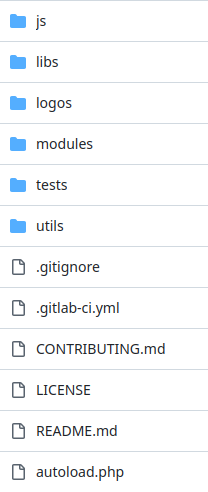
Here are the folders of the "main" of helPHP once downloaded:
- js : contains Javascript libraries (exploited by the instance at the front level), if you are familiar with the MVC model, they contain all aspects "Controllers", and may modify a "Vue" It could also be used to create Modeles, but in helPHP, this role is more traditionally on the server side rather than on the client side.
- libs : PHP libraries running on the server, including the HelPHP_module.php library, which is the foundation of all the modules, which also have MVC functions, but mainly in terms of Modele, and Controllers for data manipulation.
- Logos : if you need a helPHP logo to communicate about it (thanks in advance to help us make it known).
- modules : containing all the functional modules you have installed (but not all of which are necessarily called by your instance)
- tests : contains a few sample scripts, and unit test scripts for both checking the proper functioning of helPHP but also to have useful code example, such as the "rest" test which contains a client allowing to make "filesystem" calls in case you would want to add "cloud drive"-like functions to your project. The tests must be linked by a symbolic link or copied in the instance of your choice to work.
- util : contains all kinds of convenient utilities for the maintenance or management of your project and also serves as an example code library.
- autoload.php : at the root, the autoload.php file is intended to start loading essential libraries but also to manage calls via namespaces.
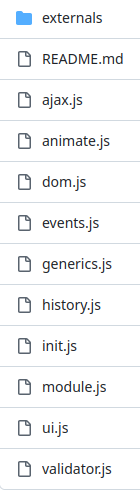
¤ Let's look at the content in JS folder :
The subfolder "External" contains the javascript elements that are not created or maintained by the helPHP team.
Conversely, what is at the root of this folder constitutes the library set for the customer part of helPHP.
We can do nearly anything with these libriaries, including animations, a complete interface, and do about everything we find in the various frameworks.
But it can be tedious to repeat important realizations like the ACE library, or the TinyMce editor, and therefore the external folder is there to host them, as well as any other components you might find useful.
We can do nearly anything with these libriaries, including animations, a complete interface, and do about everything we find in the various frameworks.
But it can be tedious to repeat important realizations like the ACE library, or the TinyMce editor, and therefore the external folder is there to host them, as well as any other components you might find useful.
Important note: When your helPHP instance is in "dev" mode, libraries are automatically loaded into the js/tmp folder of the instance to facilitate development and debug work, but it is up to you to add symbolic links (example shell command: "ln -s'.../helPHP/js/externals/..." '.../helphp_ instance/js/externals/....') from your "external" scripts to a target in the "js/externals" folder of your instance.
If you want to automate these symlinks, the installation script of the instance already create links for the "externals" provided, do not hesitate to add your symbolic links to your scripts to deploy your custom version of the instance.
The init.js file initializes the various libraries as shared objects throughout the DOM of the interface, these objects are all gathered under the simple object "h".
"h.libs.ui" allows access to the functions of the library ui.js, "h.libs.dom" of the library dom.js etc ...
The module.js file serves as the basis for the scripts that accompany and are extensions of the modules, and is intended to facilitate their inskilling.
Thus it becomes possible to access the functions of a module via "h.modules", but since the modules may have scripts for the public part and for the backoffice (admin), and it sometimes calls public scripts in the backoffice (in the case of a preview for example), one will make the difference as follows: "h.modules.burger_a.xxx" for an "admin" script and "h.modules.burger.xxx" for the public (the "_a" making the difference). This item will be discussed later and detailed in the module programming documentation.
If you want to automate these symlinks, the installation script of the instance already create links for the "externals" provided, do not hesitate to add your symbolic links to your scripts to deploy your custom version of the instance.
The init.js file initializes the various libraries as shared objects throughout the DOM of the interface, these objects are all gathered under the simple object "h".
"h.libs.ui" allows access to the functions of the library ui.js, "h.libs.dom" of the library dom.js etc ...
The module.js file serves as the basis for the scripts that accompany and are extensions of the modules, and is intended to facilitate their inskilling.
Thus it becomes possible to access the functions of a module via "h.modules", but since the modules may have scripts for the public part and for the backoffice (admin), and it sometimes calls public scripts in the backoffice (in the case of a preview for example), one will make the difference as follows: "h.modules.burger_a.xxx" for an "admin" script and "h.modules.burger.xxx" for the public (the "_a" making the difference). This item will be discussed later and detailed in the module programming documentation.
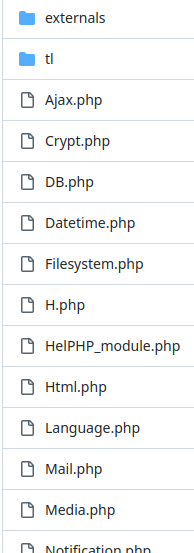
¤ Some details on the libs folder :
External : As with the js/externals folder, it is intended to contain external elements that are not maintained by the helPHP team, such as the excellent PHPmailler that will be called by the Mail.php libs to manage the sending of your emails.
The file "tl" contains common word dictionaries for the entire application (Editable from your instance with the uitranslate module!)
HelPHP_module.php provided the basic methods for all modules that are all of them extentions, and offers tools that combine the various libraries.
init.php is called by the autoload.php (which is at the root of helPHP) to create the various object of insyncation of libraries. These are therefore available for helPHP_module which, being the basis of all the modules, allows to share them in all the code. Thus, the "DB" class of the "DB.php" file becomes the $DB global object, which will then allow access to the database and the "DB" methods in all scripts. (we will see the operation in detail in the chapter on module programming).
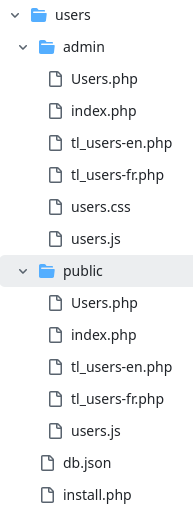
¤ Now let's look at a module folder in detail:
Here is the content of the user module (helPHP/modules/users):
- At root a file db.json and install.php that are used to install this module in an instance.
- Then an admin folder containing the elements for the backoffice module
- A public file for the frontend
- In the admin folder and the public folder there is an index.php file that will be copied into the instance when installing and allows to call this module. This file, instance side will be placed in the admin/module_name or public/module_name folder. As the module is instant, it can thus be extended in the proceeding for treatment specific to the proceeding.
- Js files will be copied to the js/tmp folder when in development mode, and included in the gz archive with all scripts after minification in "production" mode.
- If you have created css specific to this module, a CSS file can be added by the "csseditor" module in your instance.
- finally the tl_xxx files containing the dictionary for the interface. dictionary created by the "uitranslate" module in your instance.
Important note: The index.php file copied in the instance is not the only one that can manage exceptions through class extensions, but it can also place a js file or a tl file with the same name as the one in the module folder, which will then replace the one coming from helPHP, allowing to manage exceptions for a given instance.
Why?
Admit you realize an application for several clients and that they are all hosted on a single server (or container or VM) with a single repo helPHP, but one of them wants minor adaptations of the interface, or then uses a non-Western reading meaning that requires rethinking all the placements of the elements, their translation, but also the JS managing placements on screen etc...
You're not going to review the entire organization of your server only for this client!
Through class extensions and the ability to manage JS, CSS, and interface translation (tl_) exceptions at the instance level to manage the request without changing the operation for other instances.
Admit you realize an application for several clients and that they are all hosted on a single server (or container or VM) with a single repo helPHP, but one of them wants minor adaptations of the interface, or then uses a non-Western reading meaning that requires rethinking all the placements of the elements, their translation, but also the JS managing placements on screen etc...
You're not going to review the entire organization of your server only for this client!
Through class extensions and the ability to manage JS, CSS, and interface translation (tl_) exceptions at the instance level to manage the request without changing the operation for other instances.
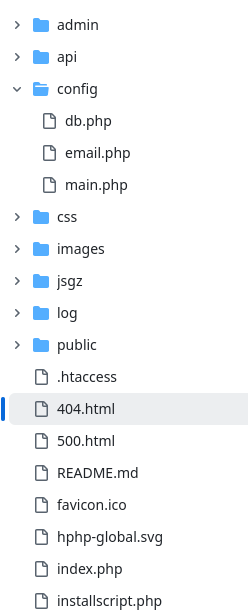
¤ The case!
At the root of the default instance is the installation script that will be called during your first display in a browser.
You will also find the indispensable .htaccess for routing, but it also contains several apache rules for safety. If you want to adapt this instance to another http server than apache, it will be the content of this file that you will have to take back for everything to work properly.
js, public, admin, log, jsgz folders are not there!!!?!! It's ok, they will be created by the installation script !
The admin folder will contain your administration (backoffice), the folder can be renamed to make life more difficult for hackers, but then you will have to indicate this name change in the config/main.php configuration file (more details in the instance configuration course).
You will also find the indispensable .htaccess for routing, but it also contains several apache rules for safety. If you want to adapt this instance to another http server than apache, it will be the content of this file that you will have to take back for everything to work properly.
js, public, admin, log, jsgz folders are not there!!!?!! It's ok, they will be created by the installation script !
The admin folder will contain your administration (backoffice), the folder can be renamed to make life more difficult for hackers, but then you will have to indicate this name change in the config/main.php configuration file (more details in the instance configuration course).
The folder api allows you to manage "REST" calls to all methods of all your modules or libraries and this automatically! A new public method in a module? It will be available immediately in the API without modification...
The folder config contains configuration files that will be modified by the installation script and that you can also change largely from the "maintenance/config" module from the backoffice. You can also change them by hand if you need to.
The folder log, allows to receive the default debug log from helphp and thus access it in http, it will contain all errors or debug messages except the fatal errors of type 500 that will remain in the apache error log!
IMPORTANT: In production, the error log automatically deactivates, but if you want to keep the instance in development mode, you should not publicly expose this log and therefore change the path of writing from that in config/main.php.
IMPORTANT: In production, the error log automatically deactivates, but if you want to keep the instance in development mode, you should not publicly expose this log and therefore change the path of writing from that in config/main.php.
TitleExecutive summary
How helphp is arranged
Date of establishment2025-11-17 00:00:00Date of publication2025-12-18 00:00:00

